Commanding multiple drone swarms and a live fire-response operation from a single tactical map.
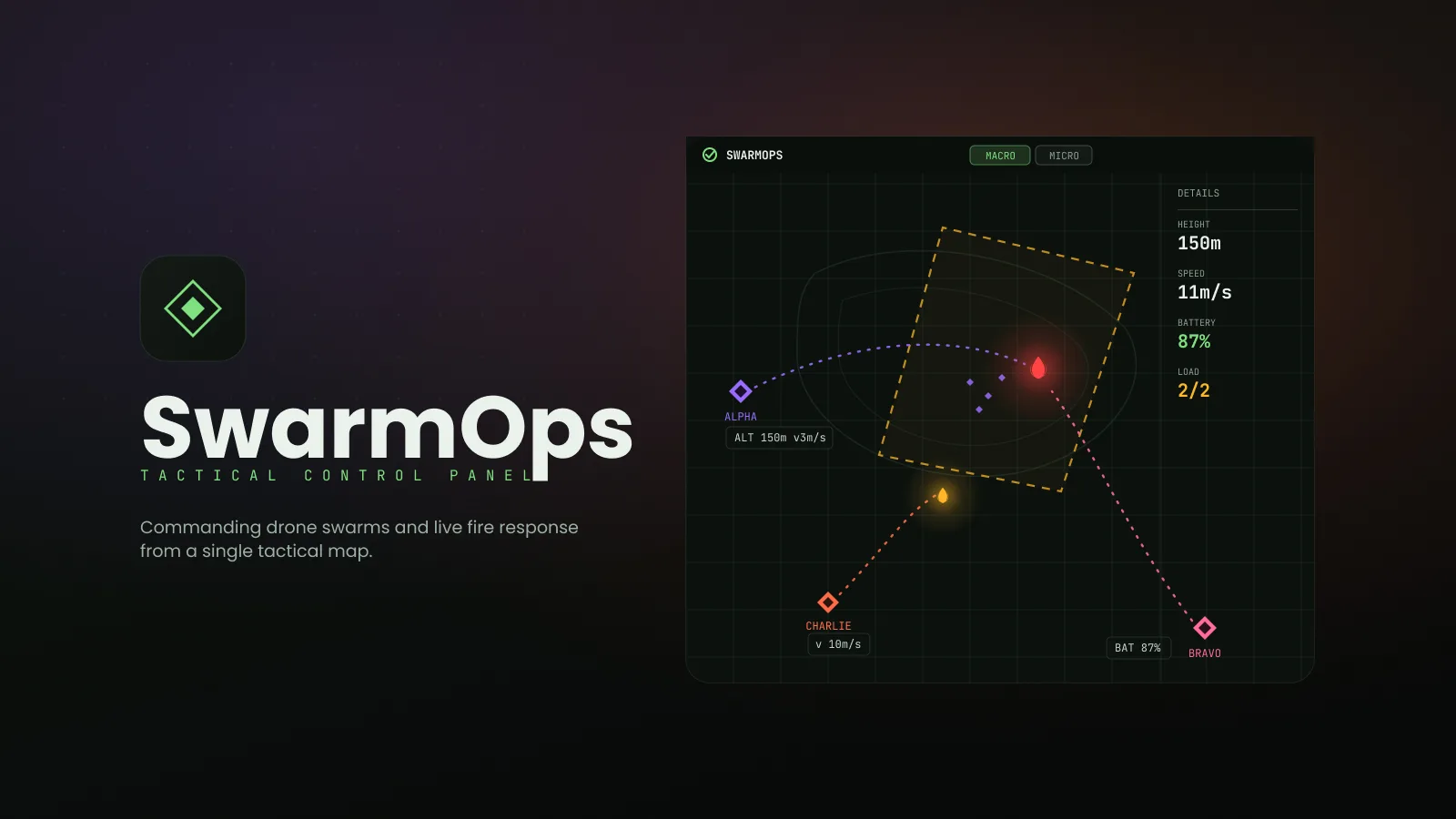
SwarmOps is an advanced tactical control panel where a single operator manages multiple drone swarms and independent drones on one map, plans missions dynamically, and directs fire-suppression UAVs. It was delivered as a 40-screen interactive prototype and a 21-screen scenario flow.
The operator has to command several swarms plus independent drones on one surface — creating a new swarm mid-crisis, handling a drone failure, responding to spreading fires, and returning every unit home safely — all without losing situational context or making a costly mis-click under pressure.
When one wrong tap can ground a fleet, the interface's job is to make the right move the obvious one.
Unify multi-swarm and independent-drone control on a single tactical map
Support dynamic mission planning — no-fly zones, re-routing, new swarms mid-mission
Prevent operator error with confirmation and alert systems on critical commands
Keep fast-changing telemetry legible with monospace type and fixed-layout panels
Enable fluid macro-to-micro movement, from fleet overview down to single-drone diagnostics
Studied 12 products across ground-control software, military C2, RTS games and monitoring dashboards to collect proven patterns for high-pressure control.
Wrote a 21-step fire-response scenario — new swarm, drone failure, spreading fire, return-to-base — as the backbone every screen had to serve.
Wireframes to a 40-screen high-fidelity Figma prototype with a fixed layout, dynamic detail panel and consistent unit colours.
Validated the flow by walking the full scenario in the prototype; no field tests with operators were run at this stage.
Drone-swarm operators and tactical command staff coordinating multi-unit emergency response in real time.
Mission analysts and response coordinators monitoring fleet status and reviewing after-action reports.
Method Desk research only — reference analysis across four domains: professional ground-control software, military command-and-control systems, RTS unit management, and logistics / monitoring dashboards. No operator interviews or usability tests were conducted.
| Task / dimension | QGroundControl | Anduril Lattice | SwarmOps |
|---|---|---|---|
| Control focus | Ground control and mission planning | Defense command-and-control platform | Emergency-response swarm prototype |
| Mission planning | Mission and waypoint tools | Mission coordination capabilities | No-fly zones, re-routing and swarm creation |
| Critical commands | Command confirmation patterns | Controls depend on deployment | Confirmation and alerts in proposed flows |
| Fleet detail | Vehicle status and mission views | Entity and operational views | Fleet-to-drone drill-down with mini-map |
| Telemetry layout | Vehicle and mission telemetry | Operational information views | Monospace numbers in fixed panels |
Reference comparison updated September 2026. Rows describe task coverage and design focus, not a usability ranking. Availability may vary by plan, region and product version; the final column describes this case study’s design. These products are cross-domain references. No field comparison or operator usability test was conducted.
Swarms and independent drones share one tactical surface with consistent unit colours, so 'who is where' never needs a second screen.
Borrowed from RTS strategic views: zoom to a single drone while a mini-map keeps the fleet in sight.
Redirect, return-to-base and emergency landing require confirmation and surface alerts before anything moves.
No-fly zones, re-routing and new swarm creation happen mid-mission without leaving the map.
reference products across 4 domains (desk research, not user data)
Patterns shared across at least three domains — side panel + map, confirmation on critical commands, colour-coded units — were adopted as the backbone; domain-specific patterns were checked against the 21-step scenario before being kept.
Multiple swarms plus independent drones must be commanded on one surface without losing context
Critical commands (redirect, return-to-base, emergency landing) risk mis-clicks under pressure
Constantly changing telemetry — altitude, speed, battery, coordinates — must stay aligned and flicker-free
Operators need to move between fleet-level overview and single-drone diagnostics instantly
Kara coordinates drone swarms during wildfire response. She reads telemetry all day, makes irreversible calls in seconds and has seen what a mis-click costs. She wants a tool that keeps the whole fleet in view and never lets a critical command happen by accident.
| Stage 01Ready System standby | Stage 02Deploy Mission planning | Stage 03Respond Fire spreads | Stage 04Handle Drone failure | Stage 05Return Mission complete | |
|---|---|---|---|---|---|
| Actions | Reviews ALPHA and BRAVO status, FIRE-01 detected | Creates CHARLIE, sets no-fly zone, assigns targets | Re-routes BRAVO to the new hotspot | Drills into DRN-15, chooses return-to-base | Issues RTB for all units, watches colour-coded routes |
| Thoughts | "Everything's green, fire confirmed." | "New swarm, new zone — done on the map." | "BRAVO is closest." | "Asymmetric thrust — bring it home." | "Three routes, three colours, no overlap." |
| Emotion | Focused | In control | Tense | Alert | Relieved |
| Opportunity | Unit list with battery, ammo, status | Swarm creation without leaving the map | Distance-to-target in the detail panel | Three unambiguous actions on diagnostics | Consistent unit colours on trajectories |
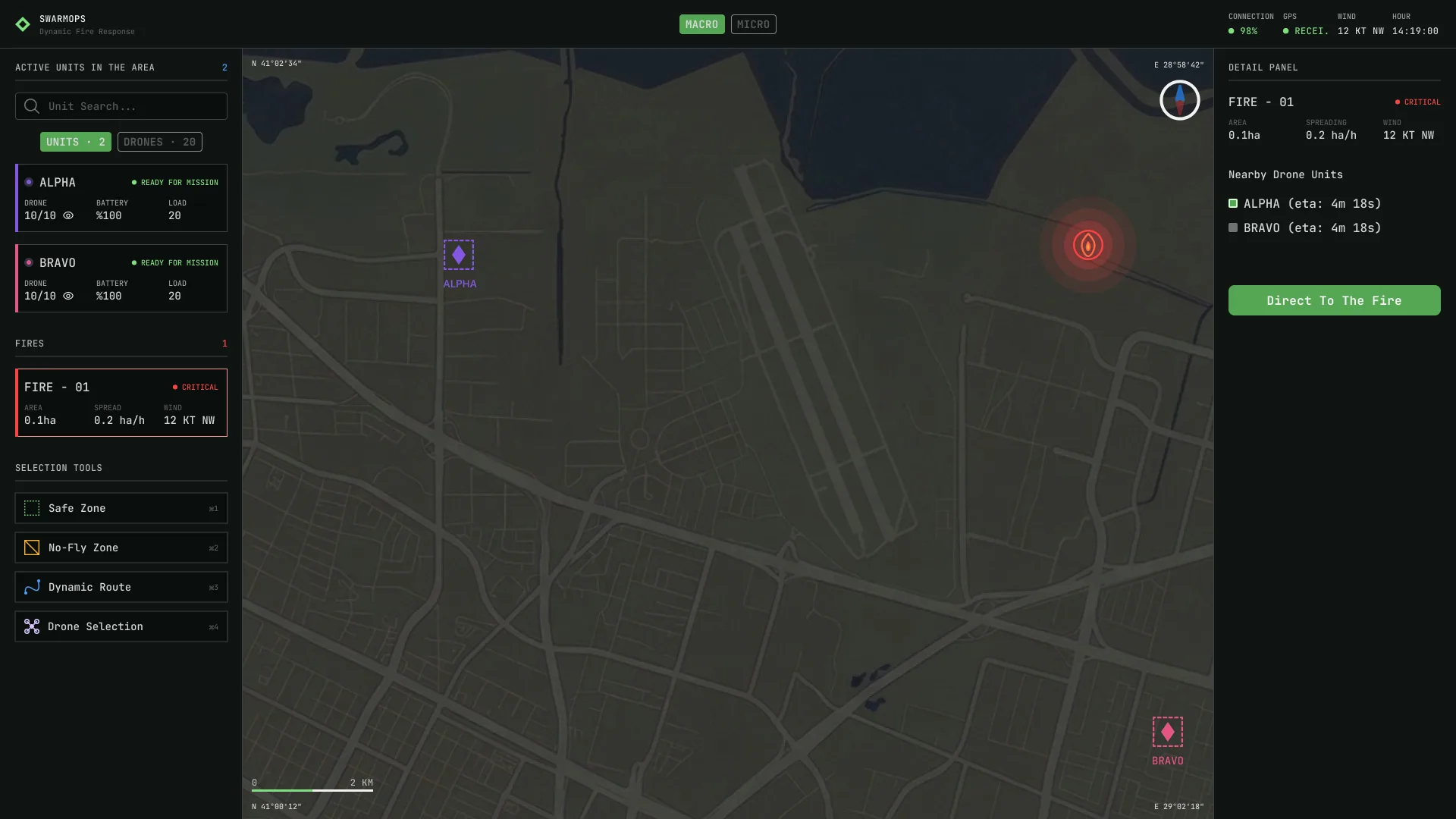
System ready — ALPHA and BRAVO on standby, FIRE-01 detected. The left panel lists active units with capacity, battery, ammo and status; the right detail panel stays empty until something is selected.
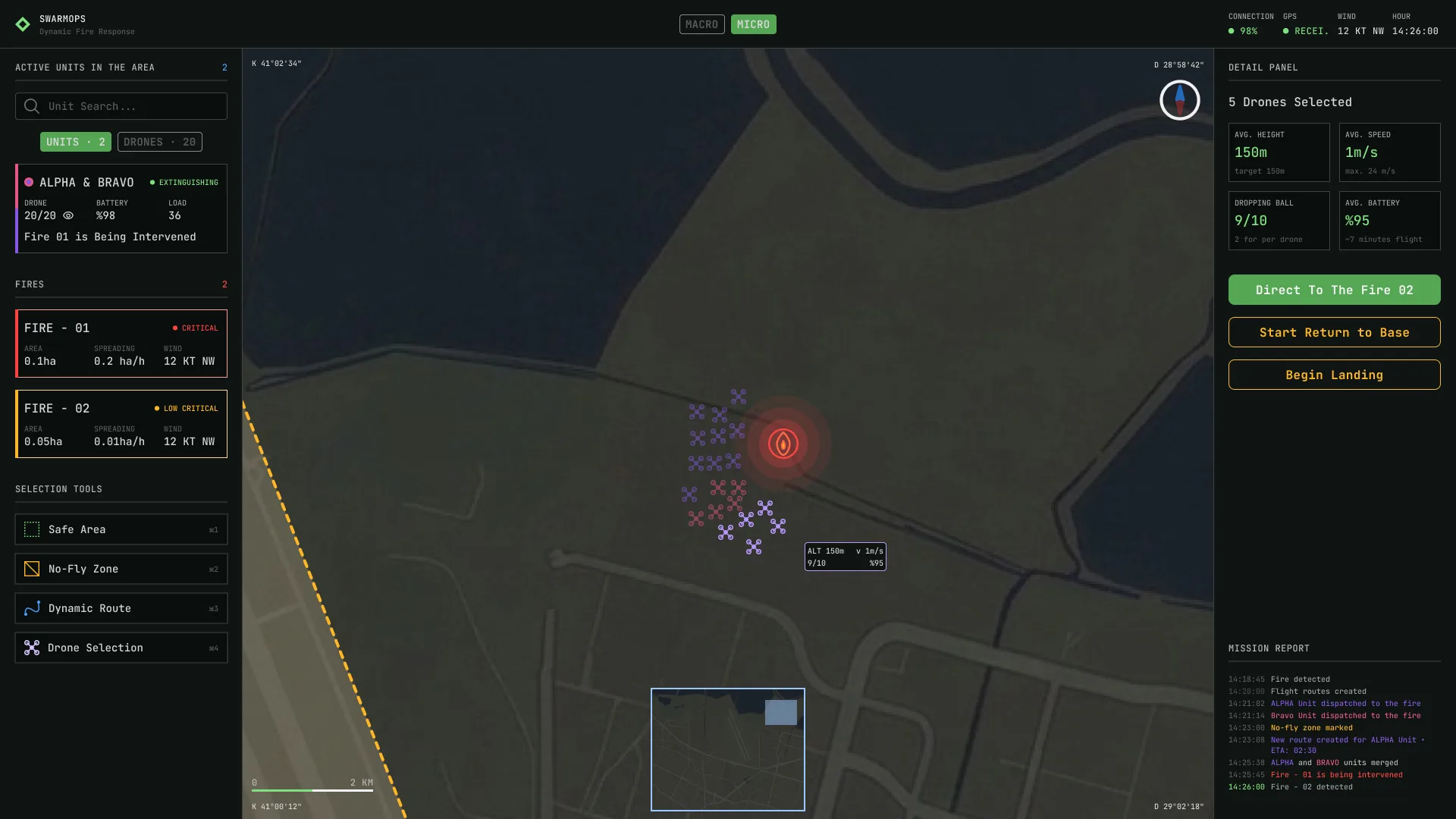
The Macro/Micro toggle — borrowed from Supreme Commander's strategic view — zooms in to individual drones while a mini-map widget preserves the macro context.
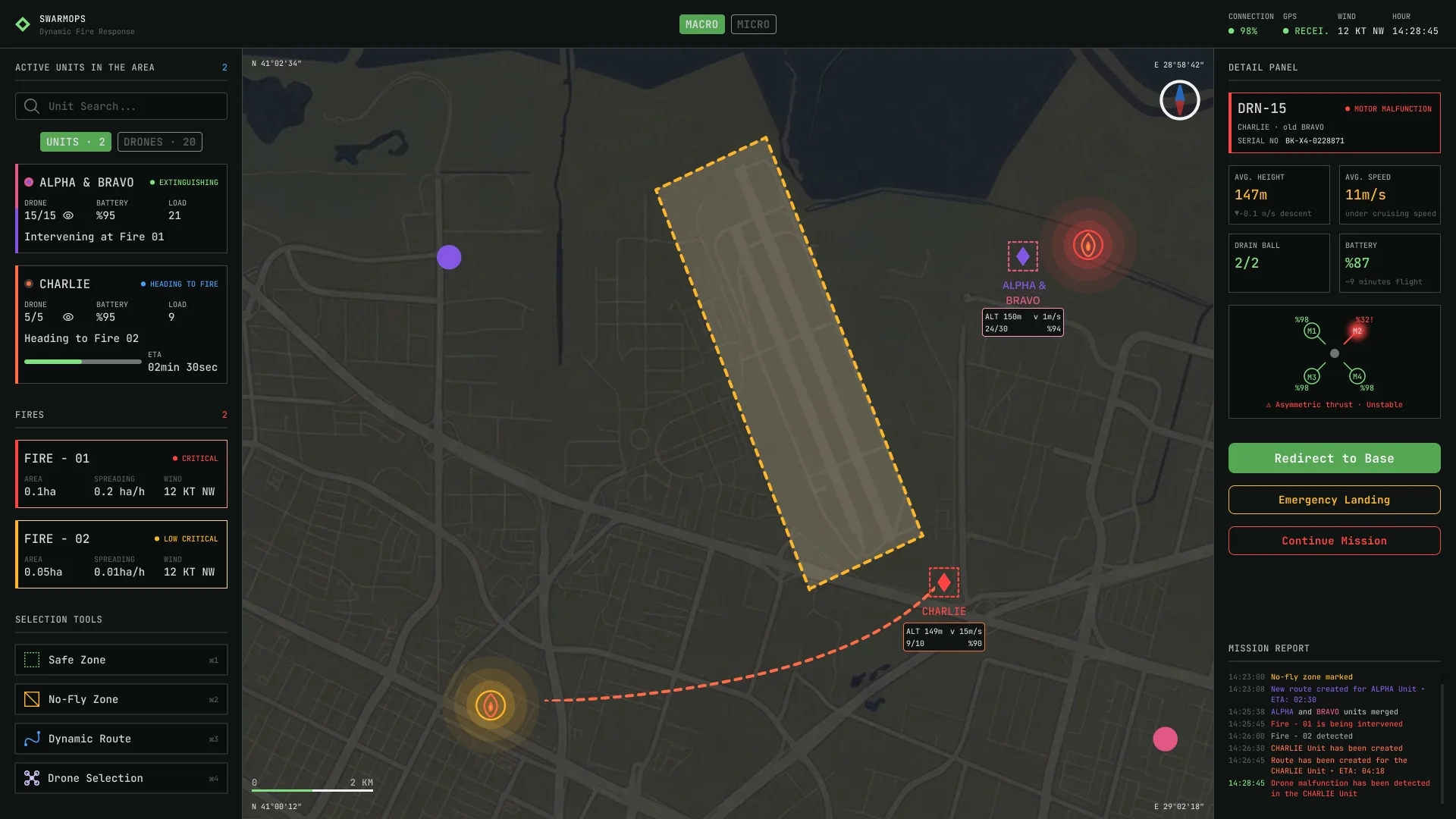
Micro drill-down to DRN-15: motor M2 running at 32% RPM, asymmetric thrust flagged. Three unambiguous actions — Return to base, Emergency landing, Continue mission — keep the critical decision clear.
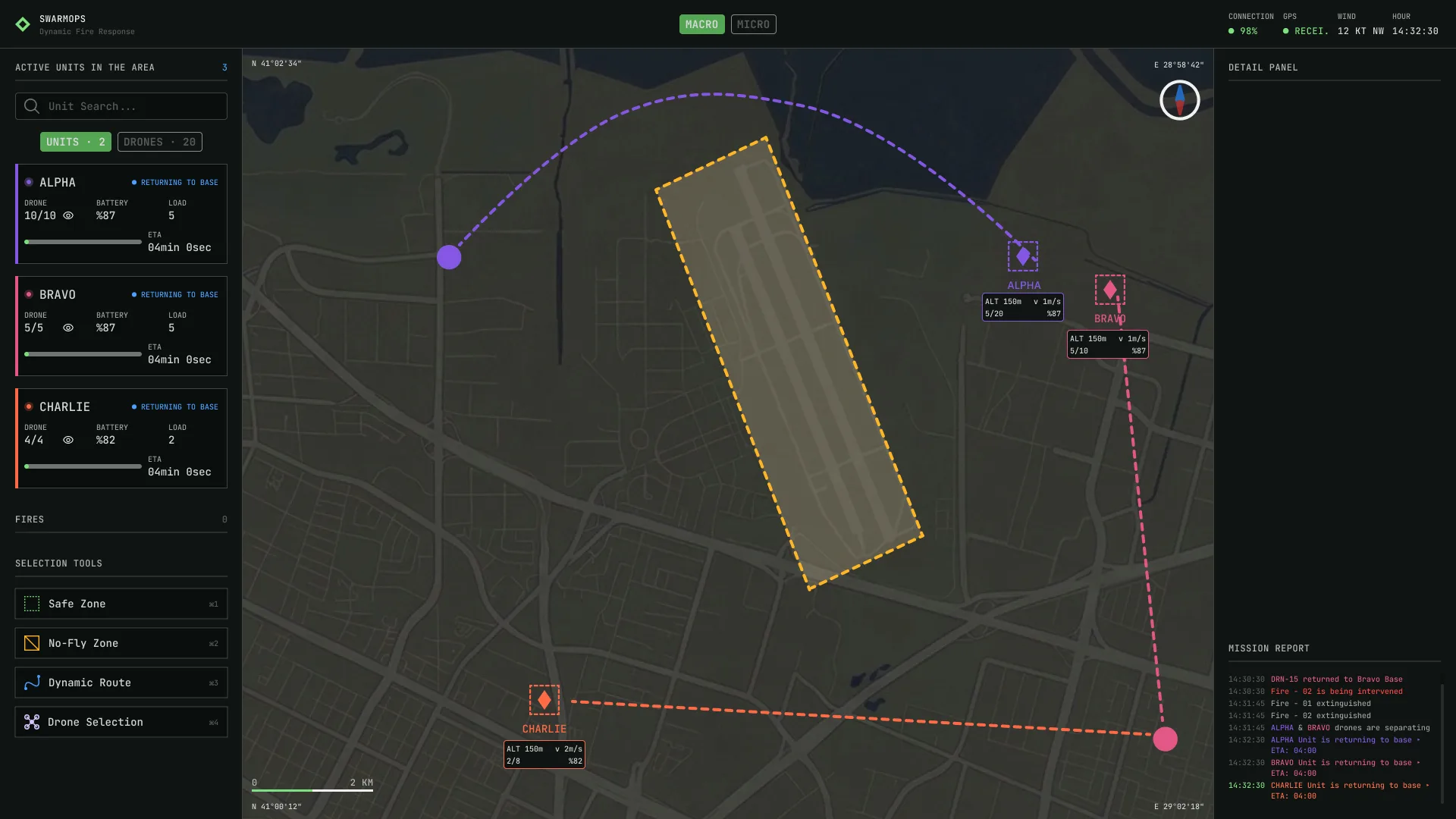
With the mission complete, all three units head home on separate colour-coded trajectories — ALPHA purple, BRAVO pink, CHARLIE orange — so 'who is going where' stays readable at a glance.
8 more screens from the final design — tap any to enlarge.
A fixed layout with a dynamic right panel, confirmation on destructive commands, and consistent unit colours were selected to guard against error paths in the scenario walkthrough. Their effect on real operator safety remains a hypothesis for field validation.
Ground-control software, military C2 and RTS games had already solved most of the problems; the work was choosing and combining, not inventing.
Monospace telemetry in fixed-width panels stopped the layout shifting under fast-changing numbers — a small choice with a large effect.
